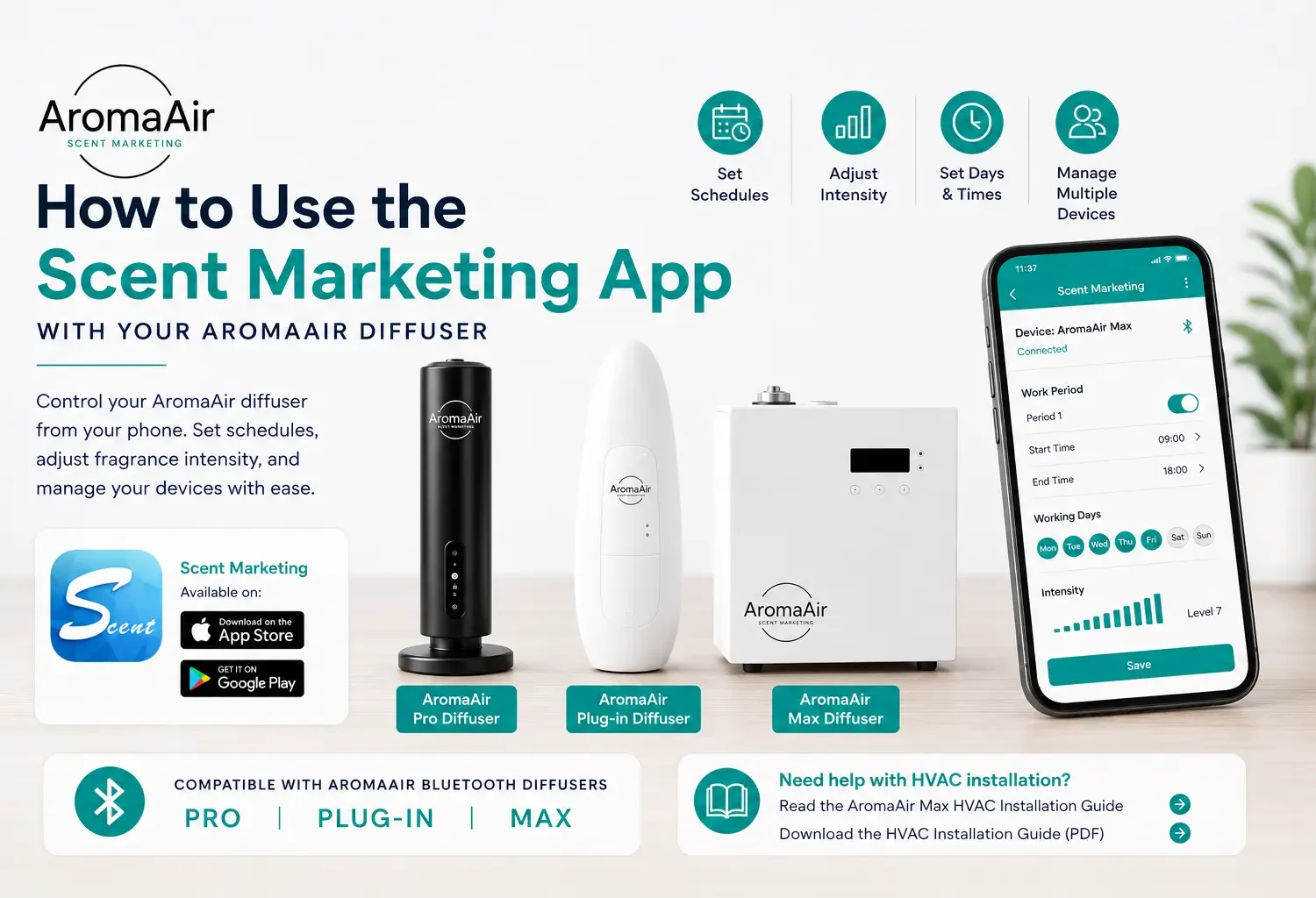

The Scent Marketing app allows you to control compatible AromaAir Bluetooth scent diffusers directly from your mobile device. Instead of adjusting your diffuser manually, you can use the app to manage operating schedules, scent intensity, working days, and other available settings.
The Scent Marketing app can be used with the following compatible AromaAir diffusers:
- AromaAir Pro Diffuser
- AromaAir Plug-in Diffuser
- AromaAir Max Diffuser
Whether you’re scenting a home, office, salon, spa, retail store, hotel, or other commercial space, the app makes it easier to customize when and how your AromaAir diffuser operates.
In this guide, we’ll explain how to download the Scent Marketing app, connect your AromaAir diffuser using Bluetooth, create a scenting schedule, adjust fragrance intensity, and troubleshoot common connection issues.
What Is the Scent Marketing App?
The Scent Marketing app is a mobile application used to control compatible Bluetooth scent diffusers from your phone or tablet.
Depending on your AromaAir diffuser model and the version of the app, available functions may include:
- Connecting to your diffuser using Bluetooth
- Setting operating hours
- Selecting operating days
- Adjusting fragrance output
- Creating multiple working periods
- Managing multiple compatible diffusers
- Renaming devices for easier identification
- Viewing device information
- Managing additional device settings
Available features and controls may vary depending on your diffuser model and app version.
Which AromaAir Diffusers Work With the Scent Marketing App?
The Scent Marketing app can be used with select Bluetooth-enabled AromaAir diffusers.
AromaAir Pro Diffuser
The AromaAir Pro Diffuser can be controlled through the Scent Marketing app, allowing you to conveniently manage compatible operating and fragrance settings from your mobile device.
→ Shop the AromaAir Pro Diffuser
AromaAir Plug-in Diffuser
The compact AromaAir Plug-in Diffuser also works with the Scent Marketing app, giving you convenient app-based control for smaller scenting applications.
→ Shop the AromaAir Plug-in Diffuser
AromaAir Max Diffuser
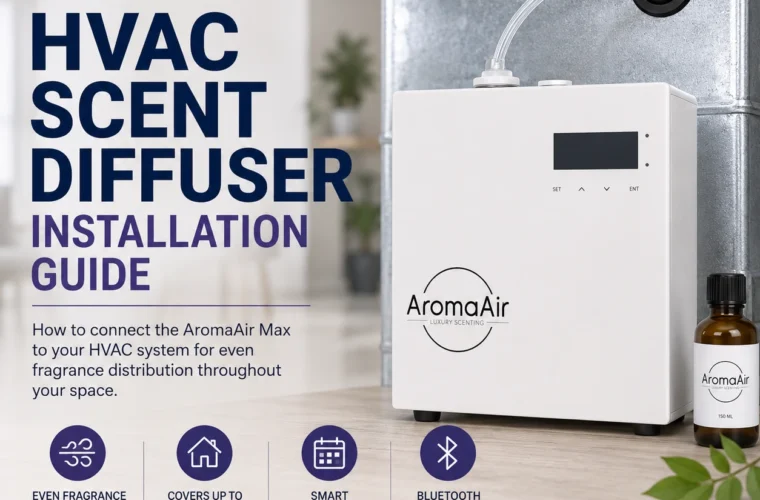
The AromaAir Max Diffuser combines Bluetooth app control with powerful large-space scenting. The Max can operate as a standalone diffuser or connect to a compatible HVAC system for more even fragrance distribution.
→ Shop the AromaAir Max Diffuser
How to Download the Scent Marketing App
The Scent Marketing app is available for both Apple and Android devices.
For iPhone and iPad
Download the Scent Marketing app from the Apple App Store:
→ Download Scent Marketing on the Apple App Store
For Android Phones and Tablets
Download the Scent Marketing app from Google Play:
→ Download Scent Marketing on Google Play
After installing the app, make sure Bluetooth is enabled on your mobile device before attempting to connect to your AromaAir diffuser.
Before Connecting Your AromaAir Diffuser
Before opening the Scent Marketing app, make sure:
- Your AromaAir diffuser is plugged in and powered on.
- Bluetooth is enabled on your phone or tablet.
- The Scent Marketing app is installed.
- You’re close to the diffuser during the initial connection.
- You’ve allowed any permissions the app requires to discover nearby compatible devices.
Staying relatively close to your diffuser during initial setup can make establishing the Bluetooth connection easier.
How to Connect Your AromaAir Diffuser to the Scent Marketing App
Once your AromaAir diffuser is powered on and Bluetooth is enabled:
- Open the Scent Marketing app.
- Allow the app to search for nearby compatible scent devices.
- Locate your AromaAir diffuser in the available-device list.
- Select the diffuser you want to control.
- Enter the device password if prompted.
- Once connected, open the device control or settings screen.
The exact appearance of the app and connection process may vary slightly depending on your diffuser model, phone and current app version.
If you’re unable to connect or aren’t sure which device to select, contact AromaAir for assistance with your specific diffuser model.
Understanding Your Scent Marketing App Settings
Once connected, you can customize when and how your compatible AromaAir diffuser operates.
Working Time
The working-time settings determine when your diffuser operates.
For example, a salon that’s open from 9:00 AM to 6:00 PM could schedule its diffuser to operate during business hours rather than running throughout the night.
Using an appropriate schedule can help maintain a consistent scenting environment while avoiding unnecessary fragrance use.
Working Days
You can select the days of the week you want your compatible diffuser to operate.
For example:
Monday–Saturday: Scenting schedule active
Sunday: Off
This is particularly helpful for businesses that don’t need fragrance running while they’re closed.
Fragrance Intensity
The app’s fragrance settings allow you to adjust your diffuser’s scent output.
We recommend starting at a lower fragrance level and increasing it gradually.
Give the fragrance enough time to circulate throughout your space before making another adjustment.
The ideal setting can vary depending on:
- Square footage
- Ceiling height
- Floor plan
- Airflow
- Diffuser placement
- Fragrance selection
- Ventilation
- Standalone or HVAC installation
The goal is generally to create a pleasant, noticeable background fragrance without making the scent overpowering.
How to Create a Scenting Schedule
One of the most useful features of the Scent Marketing app is the ability to establish an operating schedule for your compatible AromaAir diffuser.
After connecting to your diffuser:
- Open the diffuser’s control screen.
- Locate the working period or schedule settings.
- Select or add a working period.
- Choose your desired start time.
- Choose your desired stop time.
- Select the days of the week you want the schedule to operate.
- Select the desired fragrance or operating level.
- Save your settings.
Depending on the diffuser model and app version, additional scheduling options may be available.
What Fragrance Intensity Should I Use?
There isn’t one fragrance intensity that’s appropriate for every space.
We recommend starting conservatively and adjusting gradually.
After changing your setting, allow enough time for the fragrance to circulate before deciding whether it needs to be increased.
Avoid immediately setting the diffuser to its highest fragrance output.
A well-scented space should generally have a fragrance that’s noticeable when someone enters but doesn’t become overwhelming after spending time in the room.
Also remember that different fragrances can have different perceived strengths. You may need to adjust your settings when switching from one AromaAir fragrance to another.
Can I Manage More Than One AromaAir Diffuser?
The Scent Marketing app can be used to manage multiple compatible Bluetooth scent devices.
This can be especially useful for businesses with several diffusers in different areas.
For example, you might identify your devices as:
- Lobby
- Reception
- Spa
- Showroom
- Main Office
- Conference Room
Using recognizable device names can make it easier to identify which diffuser you’re adjusting.
Using the Scent Marketing App With the AromaAir Max
The AromaAir Max Diffuser can be controlled using the Scent Marketing app just like other compatible AromaAir Bluetooth diffusers.
However, the Max provides an additional installation option: HVAC scenting.
The AromaAir Max can be used:
As a standalone diffuser — fragrance is released directly into the surrounding space.
Connected to a compatible HVAC system — fragrance is introduced into the HVAC airflow to help distribute scent throughout larger or multi-room spaces.
Using the Scent Marketing App With an HVAC-Connected AromaAir Max
When your AromaAir Max is connected to a compatible HVAC system, you can still use the Scent Marketing app to manage the diffuser’s operating schedule and fragrance settings.
For best results, the HVAC fan should be running while the AromaAir Max is diffusing fragrance.
The moving airflow helps carry fragrance through the ductwork and distribute it through the vents serving your space.
If your HVAC fan is set to AUTO, keep in mind that the fan may stop whenever your heating or cooling system isn’t actively running.
When possible, coordinate your AromaAir Max scenting schedule with periods when the HVAC fan is circulating air.
Need Help With Your AromaAir Max HVAC Installation?
We’ve created a detailed guide covering HVAC scent diffuser installation, fragrance tubing, fan operation, setup and troubleshooting.
→ Read the AromaAir Max HVAC Scent Diffuser Installation Guide
→ Download the AromaAir Max HVAC Installation Guide (PDF)
Why Can’t the Scent Marketing App Find My AromaAir Diffuser?
If your AromaAir diffuser isn’t appearing in the app, try these troubleshooting steps.
Make Sure the Diffuser Is Powered On
Confirm that your AromaAir diffuser is plugged in and powered on.
Check Bluetooth
Make sure Bluetooth is enabled on your mobile device.
If necessary, turn Bluetooth off, wait a few seconds and turn it back on.
Move Closer to the Diffuser
Stay close to the AromaAir diffuser when establishing the Bluetooth connection.
Check App Permissions
Your phone may require permission for the Scent Marketing app to discover or communicate with nearby Bluetooth devices.
If you previously denied a requested permission, check the app permissions in your phone’s settings.
Close and Reopen the App
Completely close the Scent Marketing app and reopen it.
Then allow it to search for nearby compatible devices again.
Restart the Diffuser
If you’re still unable to connect, turn the diffuser off, wait briefly, power it back on and attempt the connection again.
If you continue having trouble, contact AromaAir for assistance.
Do I Need to Keep the Scent Marketing App Open?
Once a compatible AromaAir diffuser has been configured and its operating schedule has been properly saved, you generally should not need to keep the Scent Marketing app continuously open simply for that saved schedule to operate.
You can reopen the app when you want to view or change your diffuser settings.
Operation and available controls may vary by diffuser model and app version, so contact AromaAir if you’re unsure whether your settings have been properly saved.
Do I Need to Stay Connected to Bluetooth?
Bluetooth allows your mobile device to communicate with the compatible AromaAir diffuser when you’re connecting to it or changing its settings.
You generally don’t need to keep your phone continuously connected to the diffuser once a compatible schedule has been properly saved.
This allows you to configure the diffuser and then let it follow its programmed operating schedule.
Tips for Better Scenting Results
A few simple adjustments can help you get better results from your AromaAir diffuser.
Start with a lower setting.
Increase fragrance output gradually rather than starting at the highest level.
Give the fragrance time to circulate.
Avoid changing the intensity repeatedly within a short period.
Use scheduling.
Set your diffuser to operate when the space is actually being used.
Consider airflow.
HVAC systems, ceiling fans, doors, ventilation, and room layout can all affect fragrance distribution.
Adjust when changing fragrances.
Different fragrance profiles can have different perceived strengths.
For HVAC installations, run the fan.
When using the AromaAir Max with HVAC, the HVAC fan should operate during scenting for better fragrance distribution.
Frequently Asked Questions About the Scent Marketing App
What app do I use with my AromaAir diffuser?
Compatible AromaAir Bluetooth scent diffusers can be controlled using the Scent Marketing app.
Which AromaAir diffusers work with the Scent Marketing app?
The Scent Marketing app can be used with compatible AromaAir Bluetooth models including the:
- AromaAir Pro Diffuser
- AromaAir Plug-in Diffuser
- AromaAir Max Diffuser
Where can I download the Scent Marketing app?
Scent Marketing on the Apple App Store
Scent Marketing on Google Play
Does my phone need Bluetooth turned on?
Yes. Bluetooth needs to be enabled when connecting your mobile device to a compatible AromaAir diffuser through the Scent Marketing app.
Can I schedule my AromaAir diffuser?
Compatible AromaAir diffusers can use app-based operating schedules. Available scheduling controls may vary by diffuser model and app version.
Can I adjust fragrance intensity from my phone?
Compatible diffusers allow fragrance output settings to be adjusted through the Scent Marketing app.
Can I control multiple AromaAir diffusers?
The app can manage multiple compatible scent devices, which can be useful for homes or businesses with more than one diffuser.
Can I use the app with an HVAC-connected diffuser?
Yes. The AromaAir Max can use the Scent Marketing app while operating as a standalone diffuser or when connected to a compatible HVAC system.
For HVAC installations, the HVAC fan should run during scenting for better fragrance distribution.
What should I do if my diffuser won’t connect?
Make sure the diffuser is powered on, Bluetooth is enabled, you’re near the diffuser, and the Scent Marketing app has the necessary permissions.
Need Help Setting Up Your AromaAir Diffuser?
If you’re having trouble connecting your AromaAir diffuser to the Scent Marketing app, creating a scenting schedule, adjusting fragrance intensity, or setting up your AromaAir Max for HVAC scenting, we’re here to help.